
AI Browser Enhancement Is Changing How You Work Online
Written By: Shane Clark on March 19, 2026
What is AI browser enhancement?
AI browser enhancement means bringing an AI assistant right into your browser so it can read, analyze, and act on the page with you. I use it to QA websites, check SEO, and spot issues in real time. The work happens where I already am, instead of jumping between separate tools.
AI Browser Enhancement is one of those things you don’t fully understand until you actually use it.
At first, it feels like just another AI feature layered into your workflow. Another tool, another assistant, something you might try and move on from. But once it’s inside the browser with you, the experience changes quickly. You’re no longer stopping to ask questions or jumping between tabs to figure things out. Instead, the AI is right there, looking at the same page, understanding what you’re doing, and offering insights in real time.
That shift alone makes you faster.
What stands out even more is how much more efficient your work becomes when AI is actively helping you think through what you’re seeing. It starts catching things you would normally overlook. It can analyze structure, content, and user experience almost instantly. There’s less second guessing, and fewer missed details. Whether you’re reviewing a website, running QA, or digging into SEO, the process feels sharper and more complete.
This is where AI Browser Enhancement becomes more than just helpful.
Now you’re not just working in the browser, you’re working with an added layer of intelligence built into the experience itself. In some cases, that intelligence goes a step further by guiding your next move or accelerating parts of the task. In more advanced setups, it can even take action on your behalf, handling pieces of the workflow while you stay focused on the bigger picture.
That’s the real shift.
You’re still in control, but you’re no longer doing everything on your own.
What You Can Actually Do With AI in Your Browser
Once you start using AI directly inside your browser, the question stops being what it is and becomes what can I actually do with it. That’s where things get interesting, because the use cases stack up fast.
One of the most immediate wins is website QA. You can load any page and have AI review layout, content, structure, and functionality in real time. It can point out inconsistencies, missing elements, weak messaging, or things that just feel off. Even if you built the page yourself, it adds a second layer of review that catches what you might miss.
From there, it naturally extends into web development workflows. Instead of guessing why something looks wrong or digging through code blindly, you can have AI analyze what’s happening on the page and guide you toward a fix. It helps connect the visual experience with the underlying logic, which speeds up debugging and reduces back and forth.
It’s also extremely useful for SEO and content analysis. You can ask AI to evaluate headings, structure, keyword usage, and intent alignment without leaving the page. It can identify gaps, suggest improvements, and help you better match what users are actually looking for. This turns what used to be a separate audit process into something that happens instantly while you’re working.
Another big area is user experience. AI can look at a page the way a first-time visitor would and highlight friction points, confusing sections, or weak calls to action. That kind of feedback is hard to get when you’re too close to the project, but it becomes easy when you have something evaluating it objectively in real time.
Then there’s automation. In more advanced setups, AI doesn’t just analyze, it starts to assist with execution. That can mean guiding multi-step processes, helping fill in workflows, or even handling repetitive tasks depending on the tool. This is where AI automation begins to overlap with everyday browsing, turning simple actions into streamlined systems.
The bigger picture is this. You’re still doing the work, but you’re no longer doing it alone. AI is sitting in the same environment, seeing what you see, and helping you move faster with better decisions.
What AI Browser Enhancement Means for Everyday Work
AI Browser Enhancement changes how everyday work gets done because it removes the gap between what you’re seeing and what you need to figure out next. Instead of pausing to research, double check, or manually review something, the analysis is happening alongside you in real time. You stay in the flow, and the insights come to you.
This becomes especially noticeable during tasks that normally require focus and repetition. Reviewing a page, checking layout consistency, validating content, or scanning for issues all become faster because AI is processing the same information at the same time. It’s not replacing your thinking, but it is supporting it in a way that reduces friction and speeds up decisions.
Over time, this shifts how you approach work entirely. You rely less on memory and manual checking, and more on real-time validation and feedback. The result is not just speed, but confidence. You move forward knowing that what you’re seeing has already been analyzed from multiple angles.
How AI Browser Enhancement Improves Website QA
Website QA is one of the clearest examples of where AI Browser Enhancement delivers immediate value. Normally, QA requires going page by page, checking elements manually, and trying to stay consistent across multiple passes. Even experienced developers and marketers miss things simply because of how repetitive the process is.
With AI in the browser, that process changes. The AI reviews the same page you’re on and can instantly point out inconsistencies, missing elements, layout issues, or unclear messaging. It doesn’t get fatigued, and it doesn’t assume something is correct just because it looks familiar. Every element is evaluated with fresh attention.
This leads to better outcomes with less effort. Instead of relying on multiple rounds of review, you’re catching issues earlier and more consistently. It also helps surface smaller problems that would normally slip through, which adds up to a cleaner, more polished final product.
Why AI Browser Enhancement Finds Issues You Miss
Even when you know a system inside and out, it’s easy to overlook details. Familiarity creates blind spots. You expect things to work a certain way, so you don’t always question what you’re seeing. That’s where AI Browser Enhancement becomes especially valuable.
AI approaches every page without assumptions. It doesn’t carry context from previous sessions or rely on memory shortcuts. It evaluates what’s in front of it as if it’s the first time, every time. Because of that, it can identify gaps, inconsistencies, or unclear elements that a human might skip over.
There’s also the advantage of scale. AI can process multiple aspects of a page at once, from structure to content to user experience signals. While you might focus on one area at a time, it’s evaluating everything together. That broader perspective is what allows it to catch issues that would otherwise go unnoticed, even by someone experienced.
Using Tools Like Claude and Atlas for SEO and Content Analysis
Once you start using tools like Claude and ChatGPT Atlas for real work, you quickly realize how much deeper your analysis can go.
Instead of manually reviewing a page and trying to piece everything together, you can ask the AI to evaluate content, structure, and intent all at once. It can look at headings, internal linking, keyword usage, and overall clarity in a way that feels almost immediate. You’re not just getting surface-level feedback either. The insights tend to be actionable and specific, which makes them useful right away.
What makes this even more powerful is that the AI is looking at the same live page you are. You’re not copying and pasting content into a separate tool or trying to explain context. It already understands the environment, which removes a lot of friction from the process. That alone speeds things up and leads to better decisions.
These tools are also strong at identifying gaps. You might think a page is well optimized, but the AI can point out missing sections, weak transitions, or areas where the content doesn’t fully match intent. It can even suggest improvements that align better with how users actually read and interact with the page.
Over time, this becomes less about checking SEO boxes and more about improving overall quality. You’re not just optimizing for search engines, you’re improving how the page communicates, flows, and converts. That’s where the real value shows up.
Other AI Tools Enhancing the Browser Experience
Beyond the more well-known tools, there are several others that are quietly improving how work gets done directly inside the browser.
Tools like Microsoft Edge Copilot, Brave Leo, and Opera Aria are built directly into the browser itself. Instead of acting as separate extensions, they live inside the browsing experience and are always available. You can highlight content, ask for summaries, break down complex pages, or get quick insights without ever leaving the tab.
Then you have tools like Arc Max, which take a slightly different approach by focusing on workflow and usability. These types of tools are designed to help you organize, understand, and move through information more efficiently. They may not always be fully autonomous, but they significantly reduce the effort required to process what you’re looking at.
There are also more technical tools emerging, like BrowserAgent and Skyvern, which push things further toward execution. These tools can interact with pages, simulate user actions, and handle repetitive workflows. They’re especially useful for tasks like form testing, data extraction, and process automation.
What’s interesting is that all of these tools, even though they approach the problem differently, are solving the same core issue. They’re reducing the amount of manual effort required to understand and interact with the web. Whether it’s summarizing, analyzing, or actually taking action, the common theme is that the browser is becoming a much more intelligent workspace.
You’re no longer just navigating pages. You’re working inside an environment that helps interpret and improve what you’re doing in real time.
Choosing the Right AI Tool for Your Browser Workflow
At this point, it’s not about finding the “best” tool. It’s about choosing the one that matches how you actually work inside the browser.
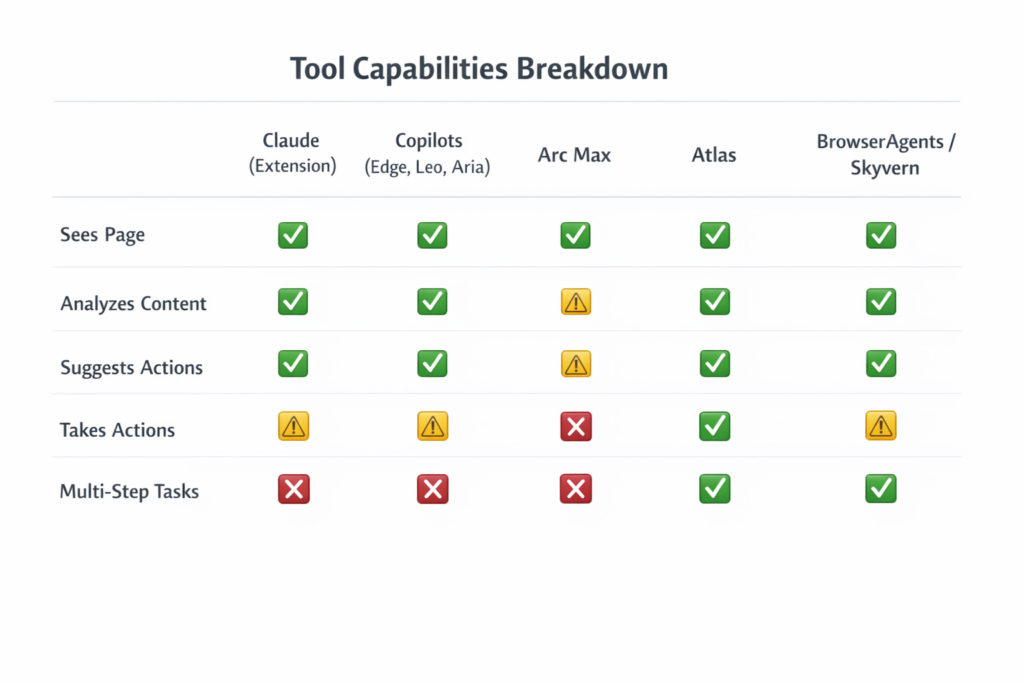
All of these tools enhance your experience, but they sit at different levels. Some help you think, some help you organize, and others actually take action on your behalf. The right fit depends on how much control you want to keep and how much you want AI to handle.
If you prefer to stay hands-on and use AI as a thinking partner, tools like Claude (with its browser extension), Microsoft Edge Copilot, Brave Leo, and Opera Aria are strong options. These tools read the page, analyze what you’re seeing, and give you insights in real time. You stay in control, but you’re working with an added layer of intelligence.
If your focus is improving workflow and reducing friction while managing information, Arc Max fits well. It helps organize your browsing experience and makes it easier to move through complex tasks without getting overwhelmed. It’s less about automation and more about clarity and efficiency.
If you want AI to start taking action for you, that’s where things shift. Tools like ChatGPT Atlas, BrowserAgent, and Skyvern move into execution. These can navigate pages, interact with elements, and handle multi-step workflows. This is where QA, testing, and repetitive tasks start to become automated.
So the real decision comes down to this:
Do you want AI to assist you, or do you want AI to act for you?
Most people start with tools that enhance their thinking, like Claude or built-in browser copilots. Over time, as confidence grows, they begin to lean into tools like Atlas or automation platforms that can handle entire workflows.
How AI Improves Website QA and Debugging
Website QA used to be a slow, manual process that depended heavily on repetition and attention to detail. Even with experience, it’s easy to overlook small issues, especially when you’ve been staring at the same page for too long. That’s where having AI in the browser makes a noticeable difference.
Instead of going through everything step by step on your own, you can have AI review the page alongside you. It can quickly identify layout inconsistencies, missing elements, broken logic, or unclear messaging. What normally takes multiple passes can often be surfaced in a single review.
This also changes how debugging works. Rather than guessing where the issue might be, you can use AI to analyze what’s happening visually and contextually. It helps connect what you’re seeing on the page with what might be happening behind the scenes, which leads to faster fixes and less trial and error.
Over time, this reduces the mental load of QA. You’re still making decisions, but you’re not relying solely on your own review process to catch everything.
Why AI Finds Issues You Might Overlook
One of the biggest advantages of using AI in the browser is that it doesn’t carry the same biases or assumptions that you do. When you build or work on something repeatedly, you naturally start to expect things to function a certain way. That familiarity can lead to blind spots.
AI approaches every page with a fresh perspective. It doesn’t assume anything is correct just because it looks familiar. Instead, it evaluates what’s in front of it as if it’s seeing it for the first time. That alone helps uncover issues that would otherwise go unnoticed.
There’s also the ability to process multiple elements at once. While you might focus on layout, content, or functionality individually, AI is evaluating all of them together. That broader view allows it to spot inconsistencies between sections, gaps in messaging, or friction points in the user experience.
The result is a more complete review, not because AI is perfect, but because it complements how humans naturally work.
Real Examples of AI Improving Your Workflow
Once you start using AI in your browser regularly, it becomes part of your workflow without you even thinking about it. Small tasks become faster, and larger processes become more manageable.
For example, reviewing a new page no longer requires multiple tools or checklists. You can analyze structure, content, and usability in one place. If something feels off, you can immediately ask for clarification or suggestions without leaving the page.
Another example is content refinement. Instead of rewriting sections manually over and over, you can get instant feedback on clarity, tone, and structure. This speeds up the editing process and helps produce stronger content with less effort.
Even simple tasks like navigating a complex site or evaluating a funnel become easier. AI can help break down what’s happening, highlight weak points, and suggest improvements in real time. It acts as a constant layer of support that keeps things moving forward.
Why AI in the Browser Is Becoming Essential
What started as a helpful feature is quickly becoming something that’s hard to work without. Once you get used to having AI available while you browse, going back to a fully manual process feels slower and less efficient.
The reason is simple. The browser is where most work happens. Whether it’s building, analyzing, researching, or managing content, everything flows through that environment. Adding AI directly into that space changes how all of those tasks are performed.
It’s not about replacing skill or experience. It’s about enhancing it. You’re still making decisions, but you’re doing it with more information, faster feedback, and fewer missed details.
As these tools continue to improve, the line between working and automating will keep getting thinner. What feels like assistance today will gradually evolve into execution. And for anyone working online, adapting to that shift early is going to be a major advantage.
Bringing AI Into Your Workflow With ShaneWebGuy
At a certain point, this stops being about tools and becomes about how you use them.
Anyone can try AI in a browser, but the real advantage comes from turning it into a repeatable process. That means knowing when to use it for QA, how to apply it to web development, how to leverage it for SEO insights, and where automation actually saves time.
That’s where I come in.
At ShaneWebGuy, I build practical systems that improve how you already work. This includes web development, SEO, and AI automation designed to fit into your daily workflow, not just tools you try once and forget.
If you want to improve your website, run better QA, streamline your workflow, or integrate AI in a way that actually works, I can help you build that out.
This isn’t about adding more tools. It’s about creating a process where AI enhances your work and helps you get better results with less effort.
Want help with the kind of web platforms or SEO programs covered here? I’m Shane Clark, the operator at ShaneWebGuy. 21 years building US web platforms and running internet marketing systems. If you want a second pair of eyes on what’s breaking, send me a note or call (408) 915-5077. US clients only.
AI Browser Enhancement FAQs
How does AI browser enhancement improve workflow
It improves workflow by reducing manual steps. You can analyze content, review pages, and get feedback instantly without leaving the browser. This speeds up decision making and helps you catch issues earlier.
Can AI browser tools really help with website QA
Yes, AI browser tools are very effective for QA. They can identify layout issues, missing elements, inconsistencies, and usability problems that are easy to overlook during manual reviews.
Are AI browser tools useful for SEO analysis
They are extremely useful for SEO. You can evaluate headings, structure, keyword usage, and content quality directly on the page. This makes SEO analysis faster and more practical during everyday work.
What is the difference between AI assistants and AI agents in the browser
AI assistants help guide your decisions and provide insights, while AI agents can take action on your behalf. Agents can navigate pages, complete tasks, and handle workflows with less manual input.
Do AI browser tools replace developers or marketers
No, they enhance their work. These tools support decision making, improve efficiency, and reduce errors, but they still rely on human input for strategy and final decisions.
Which AI browser tools are the most popular
Some of the most popular tools include Claude with browser integration, ChatGPT Atlas, Edge Copilot, Brave Leo, Opera Aria, Arc Max, and automation tools like BrowserAgent and Skyvern.
Can AI browser tools automate tasks
Some tools can automate tasks, especially more advanced ones. They can help with repetitive actions, workflow steps, and even multi-step processes depending on the setup.
Is AI browser enhancement safe to use
Most tools are safe when used properly, but you should always be aware of permissions and data access. Since these tools can see what’s on your screen, it’s important to use trusted platforms.
Why is AI browser enhancement becoming important
It’s becoming important because more work happens in the browser. Adding AI directly into that environment improves speed, accuracy, and overall productivity, making it a valuable advantage for anyone working online.
